Automate your entire video workflow with AI.Automate your entireeditingworkflow.YouTubechannel.clientwork.contentpipeline.postingschedule.
Clipping, editing, captions, motion graphics, algorithm insights and publishing. MwareX's AI handles every step, from raw footage to a published post, for creators, teams and agencies. You just give the direction.
Example: a 40-minute interview turned into three captioned shorts
Your long video · 40:3310 moments found
Source
3 picked
123
0:0040:33
3 shorts · captionedReal output
1
Short 1, from 22:27 · score 90
Caption look: Podcast Bold
2
Short 2, from 28:13 · score 86
Caption look: Punch Pill
3
Short 3, from 32:08 · score 83
Caption look: Highlighter
// Product tour
The whole studio, one feature at a time.
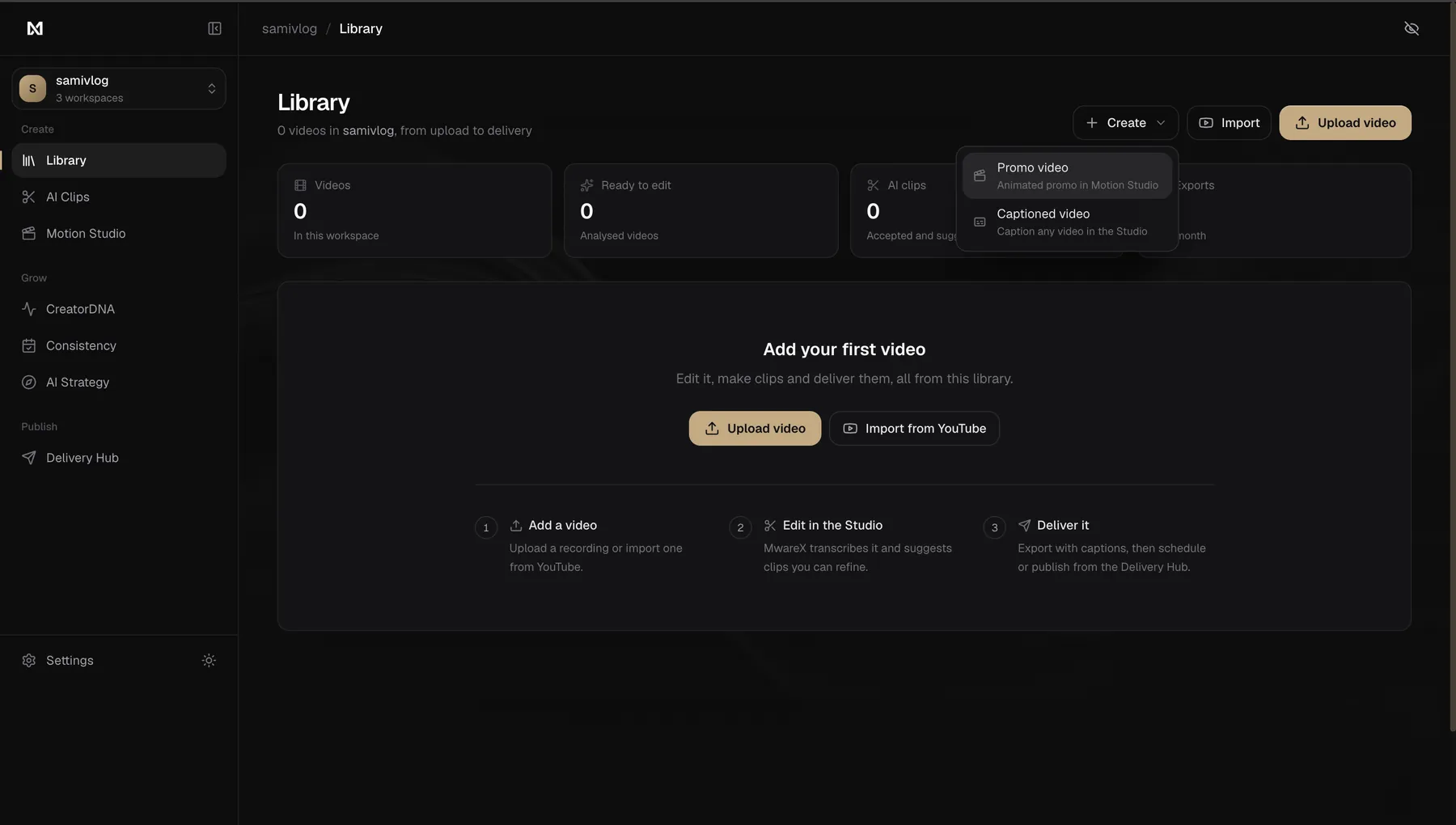
Real screens from MwareX, from the upload to the post and the plan for next week. Use the arrows, your keyboard or a swipe.
mwarex.in / library
Library
01 / 14
Step 1 of 14: Library.
Start from any video
Upload a recording or import a YouTube link. MwareX transcribes it and suggests clips.
Create a captioned video in the Studio, or an animated promo in Motion Studio.
Separate workspaces for each channel or client, on every plan.
caption looks
58
caption looks
caption languages
31
caption languages
transitions
21
transitions
Publishes to
YouTube and Shorts
Instagram Reels
MP4 + SRT for the rest
// How it works
From long video to published short, in three steps.
You bring the footage and make the calls. MwareX does the hours of editing in between.
01 · You
Add a long video
Upload a file or paste a YouTube link. Podcasts, interviews, vlogs, streams: anything with people talking.
Drop a video file
youtube.com/watch?v=…
02 · MwareX
Get finished shorts
MwareX scores every moment, cuts the best to 9:16 around the speaker, and adds captions, B-roll and transitions.
Moments found and scored
Cut to 9:16, framed on the speaker
Captions timed word by word
Stock B-roll and transitions
Title, description and tags
03 · You
Review and publish
Ask for changes in plain words, approve, then publish or schedule to YouTube and Instagram.
Your noteBigger captions, less B-roll
TitleLose eight times. Try nine.
Tags#startups #founders #shorts
Approve & publishSchedule
// Editing
Every edit a pro would make, done for you.
58 caption looks, B-roll, punch-ins, 21 transitions and 14 moment effects, each placed where it fits. Every card below is rendered by the MwareX engine, on everyday footage.
Punch PillCaption style
B-roll bubbleB-roll
Blur dissolveTransition
PunchFX
Auto reframe to 9:16Reframe
Full-frame B-rollB-roll
Punch-in zoomZoom
Light washTransition
Punch PillCaption style
B-roll bubbleB-roll
Blur dissolveTransition
PunchFX
Auto reframe to 9:16Reframe
Full-frame B-rollB-roll
Punch-in zoomZoom
Light washTransition
Rounded B-roll cardB-roll
Zoom blurTransition
HighlighterCaption style
Chroma punchFX
−2.2 s trimmed
Clean cutCut
CrossfadeTransition
Creator PopCaption style
GlitchFX
Rounded B-roll cardB-roll
Zoom blurTransition
HighlighterCaption style
Chroma punchFX
−2.2 s trimmed
Clean cutCut
CrossfadeTransition
Creator PopCaption style
GlitchFX
Rendered by the engine that exports your clips. Caption cards show each look with sample text. Hover to pause.
Clipping, editing, captions, motion graphics, strategy and publishing, each run by its own AI specialist. You keep the final say.
Clipper
Auto Clips
Finds the moments worth posting.
Reads the whole video, scores every moment on hook, context and payoff, and cuts the best to 9:16.
3, 5 or 10 clips a run, up to 15, from 15 seconds to 90.
9:16, 4:5, 1:1 or 16:9, with faces kept in frame for vertical formats.
Starts with your default caption look, in any of 31 languages.
Top 3 of 10 moments
40:33
When we speak about innovation and moonshots, it's all about taking risk.90
22:27
Nine years ago I pushed for a more sovereign Europe, and colleagues said it would never work.86
28:13
Is the dollar's dominance over the world about to end?83
32:08
Editor
Studio
Edits each clip like a pro.
Reframes on the speaker, adds stock B-roll, transitions and moment effects. Ask for changes in plain words.
Transitions sit on the cuts: crossfade, light wash and more.
Zoom punch-ins land on the words you emphasise.
Auto-polish finishes a clip in one click: captions, look, zooms, transitions and voice.
Edit with AI›make the captions bigger and add B-roll
Video
B-roll
Captions
Cuts
Reframe · B-roll · 21 transitions · moment effects
Captioner
Captions
Captions in 31 languages.
58 animated looks, timed word by word to the voice.
Every line is word-timed, with key words highlighted.
Edit, split or merge lines, or translate them.
Word timed
We have to be more innovative
We have to be more competitive
Hindi
Hinglish
Bengali
Marathi
Tamil
Telugu
+25 more
Motion designer
Motion Studio
Intros, promos and end screens.
Start from a template, change the words, export the video in your browser.
6 themes, 8 animated backgrounds, 4 formats.
Up to 12 scenes, or let the AI write the storyboard.
Exports right in your browser.
Strategist
AI Strategy
Plans what to post next.
A two-week posting plan built from your own videos.
Every idea quotes your transcript; ideas whose quote can't be found are dropped.
Open an idea in the Studio, make a promo, or schedule it.
Two-week plan
M
T
W
T
F
S
S
M
T
W
T
F
S
S
Sat · ShortIs the dollar's reign ending?
Example
Analyst
CreatorDNA
Explains what works on your channel.
Reads your YouTube analytics and suggests your next three videos.
Subscribers, 90-day views, upload pace, median views and retention.
Next moves: video ideas with the format, the why and an opening line.
Views per upload
Best: tutorials
Your report
01Next three videos
02Audience
03Upload timing
Example
Publisher
Delivery Hub
Writes the post and ships it.
Titles, descriptions, tags and first comments, published or scheduled to YouTube and Instagram.
A post kit for every platform: title, caption, hashtags and hook.
Posts your first comment on YouTube.
YouTube
Fri 6:30 pmUploading✓ Published
Lose eight times. Try nine.
Why the biggest wins start with accepting you will fail first.
#startups #founders #shorts
This week
M
T
W
T
F
S
S
YouTubeInstagram
Example
Consistency reward
Post three times a week for four weeks. Get a month of Pro, free.
MwareX counts real public posts on your connected YouTube and Instagram, including the ones it publishes for you. Weeks run Monday to Sunday. One reward per person.
Week 1
Week 2
Week 3
Week 4
One more post this week unlocks it.
// Motion design
Pick a template. Make it yours in minutes.
Intros, end screens, chapter cards, lower thirds, launch promos and animated charts, built in Motion Studio. Click any text to change it, then export the video right in your browser.
Keep captions in the language you speak, or switch any clip to one of 31 Indian and global languages. MwareX transcribes the speech, translates it with the whole clip as context and times every word to the voice.
Indian · 14
Hindiहिन्दी
HinglishRoman Hindi
Bengaliবাংলা
Marathiमराठी
Tamilதமிழ்
Teluguతెలుగు
Gujaratiગુજરાતી
Kannadaಕನ್ನಡ
Malayalamമലയാളം
Punjabiਪੰਜਾਬੀ
Odiaଓଡ଼ିଆ
Urduاردو
TanglishRoman Tamil
BanglishRoman Bengali
Global · 17
English
SpanishEspañol
Portuguese (Brazil)Português (Brasil)
FrenchFrançais
GermanDeutsch
Italiano
DutchNederlands
RussianРусский
TurkishTürkçe
Arabicالعربية
IndonesianBahasa Indonesia
VietnameseTiếng Việt
Thaiไทย
Japanese日本語
Korean한국어
Chinese (Simplified)简体中文
Filipino
Transcript·Hindi
Captions·English
A real clip: the Hindi transcript MwareX made of the speech, and the English captions it translated from it.
// Compared
What a week of shorts really costs, three ways.
Your time and money for ten shorts a week from one hour-long video. Rough estimates, so you can check them against your own.
Estimated time and cost of making 10 shorts a week from one hour-long video
What
Doing it yourself
Hiring an editor
MwareX
Your time each week
6 to 10 hours of cutting and captioning
1 to 2 hours of briefs, notes and review
30 to 60 minutes reviewing and approving
Turnaround
Evenings and weekends
2 to 5 days per batch
Same day
Captions, B-roll, transitions
Each one by hand
Depends on the editor, often extra
Included on every clip
Titles, tags, scheduling
You write and post each one
Usually still you
Post kit written, published or scheduled
Cost for ~40 shorts a month
Your hours
Per-short fees, every month
One Pro subscription
Doing it yourself
Your time each week
6 to 10 hours of cutting and captioning
Turnaround
Evenings and weekends
Captions, B-roll, transitions
Each one by hand
Titles, tags, scheduling
You write and post each one
Cost for ~40 shorts a month
Your hours
Hiring an editor
Your time each week
1 to 2 hours of briefs, notes and review
Turnaround
2 to 5 days per batch
Captions, B-roll, transitions
Depends on the editor, often extra
Titles, tags, scheduling
Usually still you
Cost for ~40 shorts a month
Per-short fees, every month
MwareX
Your time each week
30 to 60 minutes reviewing and approving
Turnaround
Same day
Captions, B-roll, transitions
Included on every clip
Titles, tags, scheduling
Post kit written, published or scheduled
Cost for ~40 shorts a month
One Pro subscription
Estimates for 10 shorts a week from one hour-long video. Time depends on your footage and how much you change; editor fees are rough freelance ranges, not a survey. Your numbers will vary.
Pricing
Try it for 3 days. Stay if it works.
Try every Pro feature for 3 days with a one-time trial, then pick a plan with clear monthly allowances. No autopay, and failed jobs are never charged.
Loading prices…
// FAQ
Questions, answered.
The trial, your data, and what MwareX can and can't do. Something missing? Ask us.
Is there autopay? Will I be charged again?
No. The trial is a one-time payment of a small one-time fee for 3 days of Pro. Nothing renews: when the 3 days end, your account goes back to the Free plan. Pro itself is also a one-time payment for a month (the monthly Pro price a month), so it ends too unless you choose to pay again.
What do I get during the 3-day trial?
The Pro plan: Auto Clips, every caption look, B-roll, transitions, the Studio, 1080p export and publishing to YouTube and Instagram. The trial's exact allowances are shown at checkout before you pay.
Do I still have to edit?
No. Clips arrive cut, framed, captioned and edited. To change one, type what you want in plain words (“bigger captions”, “less B-roll”) with Edit with AI, or adjust anything by hand in the Studio: start and end, caption words, looks, B-roll and transitions.
Which languages does it support?
Captions in 31 languages, Indian and global: Hindi, Hinglish, Bengali, Marathi, Tamil, Telugu, Gujarati, Kannada, Malayalam, Punjabi, Odia, Urdu, Tanglish, Banglish, English, Spanish, Portuguese (Brazil), French, German, Italian, Dutch, Russian, Turkish, Arabic, Indonesian, Vietnamese, Thai, Japanese, Korean, Chinese (Simplified) and Filipino. It transcribes what you said in most widely spoken languages, then keeps the captions in that language or translates them into any of the others, with the whole clip as context.
Where can it publish?
YouTube (including Shorts) and Instagram Reels, right away or on a schedule. Instagram needs a Business or Creator account. For anywhere else, download the 1080p MP4 and the SRT caption file.
How long can my video be?
On Pro, source videos can be up to the plan's limit long; on Free, up to the plan's limit. Full-video editing (captions and the Studio on the whole long video, not just clips) goes up to 4 hours on the Team plan. Each plan's monthly allowances are listed in the pricing above.
What happens to my videos and data?
Your uploads are stored privately and used only to make your clips. Transcripts are processed by Claude, Anthropic's AI, to pick moments and write posts. Google sign-in asks for your name, email and permission to upload to YouTube, and nothing is posted unless you publish or schedule it. Details are in the privacy policy.
What does CreatorDNA need?
A connected YouTube channel with at least a few videos. It reads your channel's analytics (views, watch time, retention when YouTube shares it, likes, shares and comments), works out what your best videos have in common and when your audience watches, and suggests your next three videos. The numbers come from your channel, not from the AI.
Can I start without paying?
Yes. The Free plan runs the whole workflow on shorter videos with smaller monthly allowances. Create a free account.
Hand MwareX the editing. Keep the creative calls.
Clipping, captions, motion graphics and publishing, on autopilot. Try every Pro feature on your own videos for 3 days for a small one-time fee. One payment, nothing renews.